ACCOUNT DELETION
Delete Your Kataris Account
How to delete your Kataris account and its data on the website or in the App, and what is kept.
Kataris, a product of Katarite Pte. Ltd.
1. Summary
You can delete your Kataris account, and the personal data associated with it, at any time. This page explains how to do it, what is deleted, and what is kept.
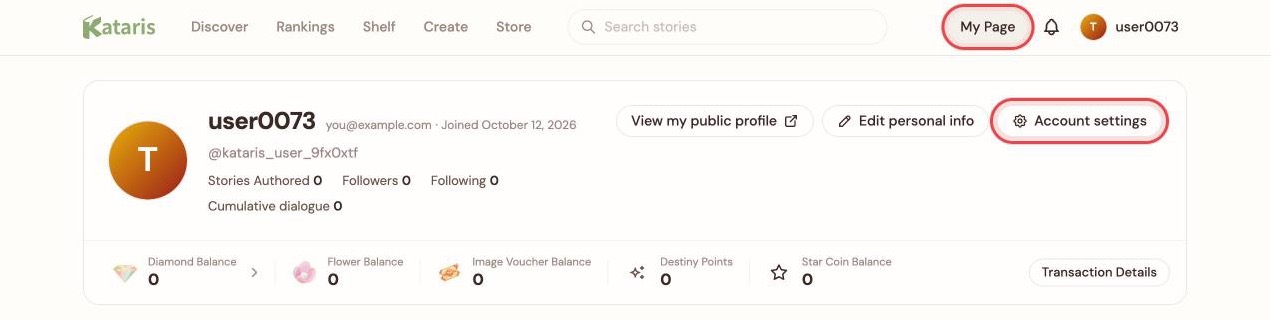
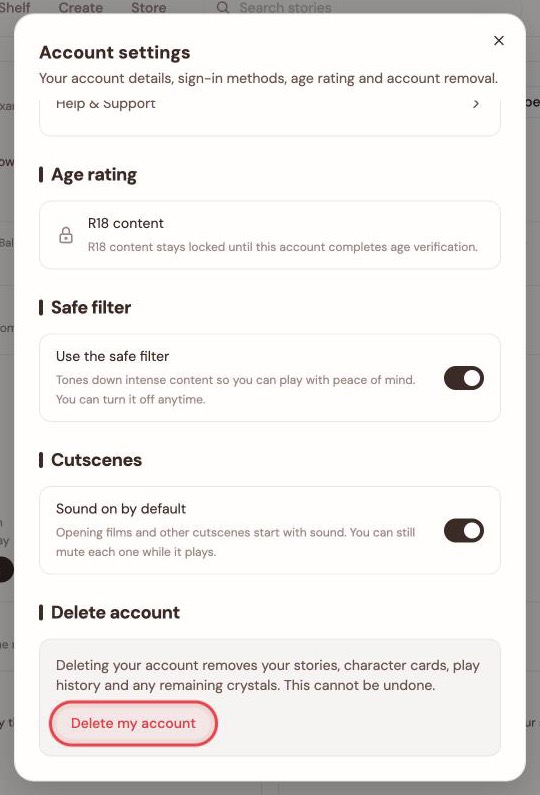
- On the website: My Page → Account settings → Delete account → Delete my account.
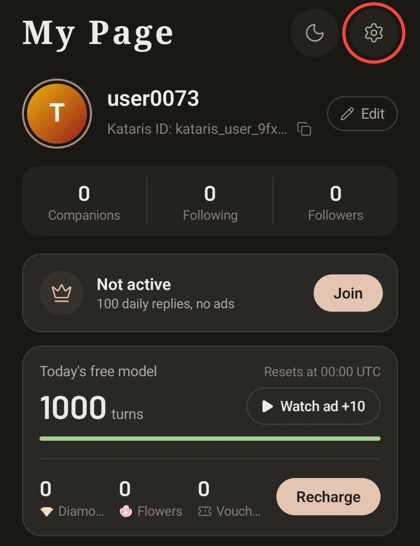
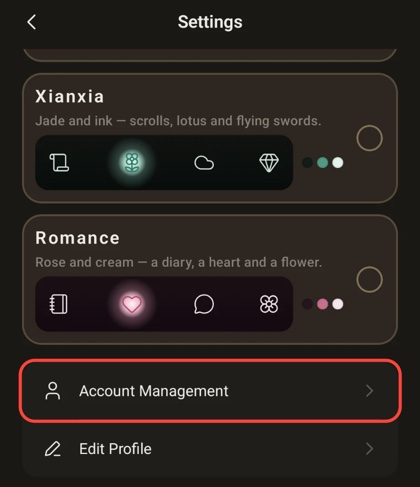
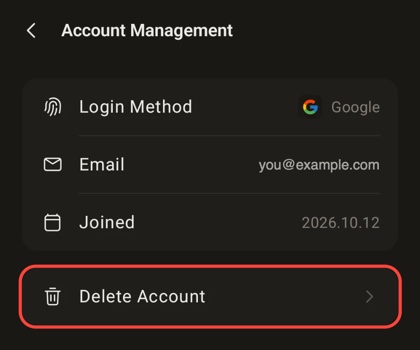
- In the Kataris App (iOS and Android): Me → Settings → Account Management → Delete Account.
- Cannot sign in? Emailsupport@kataris.ai and we will delete the account for you (Section 4).
- Paid membership? Cancel it first with the store you bought it from (Section 5).
- Can it be undone? No. Once deletion is carried out it is permanent.
2. Delete Your Account on the Website
You need to be signed in to the account you want to delete.
Step 1: Open My Page, then Account settings. Sign in to Kataris and chooseMy Page in the top bar. At the top of My Page, chooseAccount settings.
Step 2: Choose "Delete my account". Scroll to the bottom of Account settings. The Delete account section states what deletion removes. ChooseDelete my account.
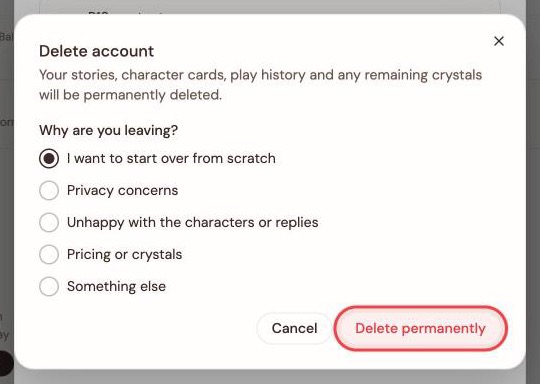
Step 3: Confirm. A confirmation dialog asks why you are leaving. Pick a reason (if you pick "Something else", add a short note), then chooseDelete permanently. Your account is deleted and you are signed out.
3. Delete Your Account in the App
You need to be signed in to the account you want to delete. It is the same deletion as on the website, and it deletes the same data.
Step 1: Open Settings. In the Kataris App, tap Me in the bottom bar, then tap the Settings gear at the top right of My Page.
Step 2: Tap "Account Management".
Step 3: Tap "Delete Account".
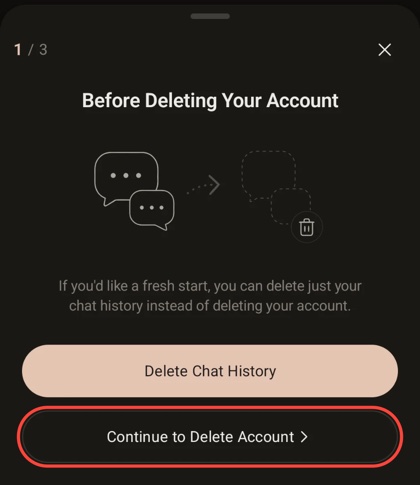
Step 4: Choose "Continue to Delete Account". The first screen offers to delete only your chat history instead (Section 9). To delete the whole account, tapContinue to Delete Account.
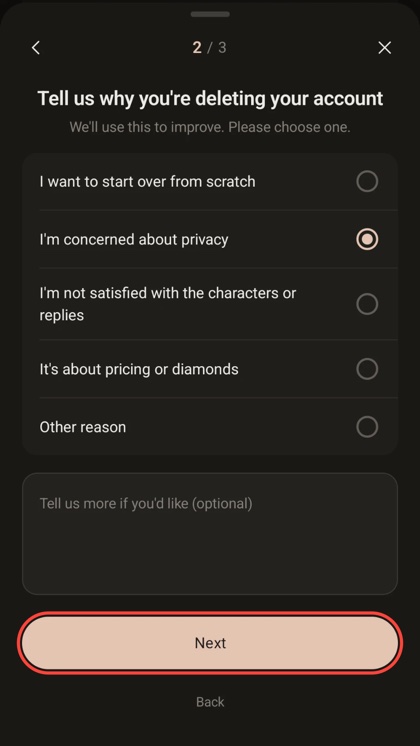
Step 5: Tell us why. Choose a reason, add a note if you like (optional), then tap Next.
Step 6: Confirm. The last screen lists what will be deleted. TapDelete Account to delete your account, orCancel Account Deletion to keep it.
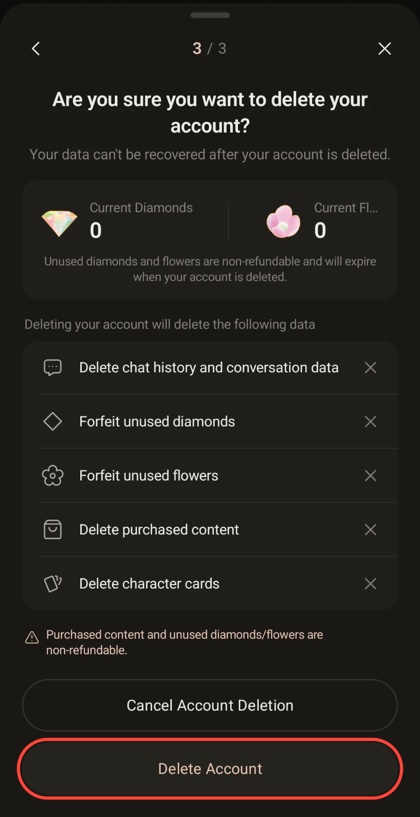
If you no longer have the App installed, use the website (Section 2) or email us (Section 4). You do not need to reinstall the App to delete your account.
4. Request Deletion Without Signing In
If you cannot sign in, for example because you lost access to the sign-in method you used, you can ask us to delete your account:
- Email support@kataris.ai from the email address registered to your Kataris account, with the subject "Account deletion request".
- Include your @handle if you know it.
- We verify that the request comes from the account holder before deleting anything, and we respond within the period required by applicable law.
5. Before You Delete: Cancel Any Paid Membership
An account with an active paid membership cannot be deleted. This keeps a deleted account from being billed again.
- If you subscribed through the App Store or Google Play, cancel auto-renewal in that store's subscription settings. Deleting your Kataris account does not cancel a store subscription by itself.
- Once the current membership period has ended, the deletion steps above become available.
6. What Is Deleted
When your account is deleted:
- Sign-in access is removed: your linked sign-in methods (such as Google or Apple), your password and every active session. The account can never be signed in to again; signing up later with the same email address creates a new, empty account.
- Your personal profile information is erased: your name, email address, profile picture and bio.
- Your stories and character cards are deleted.
- Your play history, chat history and conversations with characters are deleted.
- Content you purchased is deleted.
- Any unused crystals, diamonds and flowers are forfeited. Purchased content and unused balances cannot be refunded or transferred to another account.
Electronic records are deleted by non-recoverable means.
7. What Is Kept
Some information is kept after deletion because the law requires it or to prevent abuse:
- Records of misuse and sanctions are kept for up to 1 year after deletion, to prevent repeat abuse.
- Purchase and transaction records are kept for as long as commercial, tax and consumer-protection law requires.
- The reason you gave for leaving is kept, without your name or email address attached, to help us improve Kataris.
8. Scheduled Deletion
Deletion normally takes effect as soon as you confirm. If a waiting period applies to your account, the Delete account section shows the date your account will be deleted, together with a Cancel deletion button. Until that date your account works as usual and you can cancel. After that date deletion is carried out and cannot be undone.
9. Alternatives to Deleting
If you only want a break or a fresh start, you may not need to delete anything:
- Sign out. Your stories, characters and progress stay as they are until you come back.
- Delete only your chat history. In the App, the first deletion screen offers Delete Chat History, which clears your conversations and keeps your account.
- Edit your profile. Change your name, picture and bio under My Page → Edit personal info.
- Turn on the safe filter. Account settings → Safe filter tones down intense content.
10. Contact
Questions about deleting your account or your personal data:support@kataris.ai
How we handle personal information is described in full in theKataris Privacy Policy and the Kataris App Privacy Policy.